


نحوه کار با پرینتر Brother
رفع مشکل عدم پرینت در پرینترهای brother + رفع مشکل offline+رفع روشن ماندن چراغ Toner. پرینتر برادر یکی از بهترین مارک ها و برند های برتر پرینتر در جهان می باشد .

در این مطلب قصد داریم نحوه کار با پرینتر برادر (Brother) را آموزش دهیم ، پس با ما همراه باشید.
عدم پرینت در پرینترهای brother + رفع مشکل offline+رفع روشن ماندن چراغ Toner؟

در این حالات ممکن است پرینتر اصلا پرینت نگیرد و شما پیغام Printer is offline دریافت کنید. یا به تازگی کارتریج خود را شارژ کرده باشید و چراغ Toner شما روشن باشد. برای حل این مشکل مراحل زیر را دنبال کنید:

1- پرینتر به کامیوتر متصل باشد.
2-پرینتر را خاموش کنید.
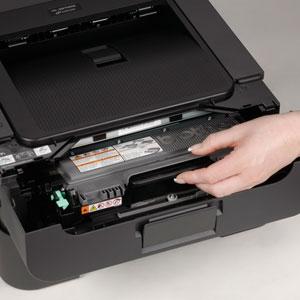
3-درب جلوی پرینتر را باز کنید
4- مجموعه درام و کارتریج را خارج کنید.با استفاده از دکمه تعبیه شده کارتریج را از درام جدا کرده و سپس به هم متصل کنید.
5-مجموعه را در جای خود داخل پرینتر قرار دهید
6-دکمه Go را نگه داشته و پرینتر را روشن کنید.
7-بعد از اینکه چراغ های toner . drum . error هر سه روشن شد دکمه Go را رها کنید.
8- بعد از 2 ثانیه 2 بار دکمه Go را پشت سر هم فشار دهید
9- دو ثانیه بعد مجددا دکمه GO را 5 بار فشار دهید.
10-درب جلوی پرینتر را ببندید
11-بعد از آماده باه کار شدن پرینتر یک بار خاموش و روشن کنید.
12-پرینتر شما آماده پرینت می باشد.
پرینتر brother 2130 رو وقتی روشن میکنم چراغ زرد (Tonrer ) روشن میشه ، مشکل از چیست و چطور باید رفعش کنم؟
روشن شدن چراغ تونر به معنی تمام شدن تونر دستگاه میباشد برای رفع باید کارتریج را شارژ و بعد دستگاه را ریست نمایید. برای ریست دستگاه مراحل زیر را دنبال کنید:

1- دستگاه را خاموش کنید
2 – دکمه go را نگه داشته و دستگاه را روشن کنید
3 – بعد از روشن شدن چراغهای پنل go را رها کرده و 2 بار بزنید صبر کنید تا چراغها روشن شود
4 – حالا 5 بار go را فشار دهید
5 – اکنون درب دستگاه را ببندید.

How to work with Brother printers
Fix the problem of non-printing on brother + printers Troubleshoot the offline problem + Turn off Toner lights. Brother Printer is one of the best brands and top brands of printers in the world.
In this article, we’re going to teach you how to work with your Brother printer, so stay tuned to us.

Unresectable printers in brother + Fix offline problem + Turn off Toner lights?
In this scenario, the printer may not print at all, and you will get the Printer Offline message. Or you recently recharged your cartridge and your Toner light is on. To solve this problem, follow these steps:
1. The printer is connected to the computer.
2. Turn off the printer.
Open the front door of the printer
4. Remove the drum and cartridge assembly. Use the embedded button to remove the cartridge from the drum and then plug it in.
Place the 5-set inside the printer
6. Hold the Go button and turn on the printer.
7. After the toner lights. Drum Error All three clear the Go button.
8- After 2 seconds, press the Go button twice continuously
9-2 seconds later, press the GO button again 5 times.
Close the 10-door front of the printer
11. Turn off and turn on the printer one time after you are ready.
12-Your printer is ready to be printed.

When I turn on the brenda 2130, the yellow light (Tonrer) turns on, what is the problem and how should I fix it?
Turning off the toner light means the toner is running out of the machine. To fix it, charge the cartridge and then reset the device. Follow the steps below to reset your device:
1. Turn off the device
2 – Hold the go button and turn on the device
3 – Leave the go up after turning on the lights and wait 2 times until the lights turn on.
4 – Now press 5 times
5 – Close the door now.

منبع وب سایت By-M-R-Y.blog.ir و گوگل می باشد.
ممنونم از اطلاعات ارائه شده