


How to use fingerprint scanners
How fingerprint scanners work
Having your fingerprints taken at a police station involves pressing your fingers onto an ink pad and then rolling your fingers onto paper to leave a clean impression on the page. Your prints are also stored on a computer database so the police can check if you’ve committed any known crimes or if you do so in future.
But when fingerprints are being used to control access to buildings and computer systems, more sophisticated methods have to be used: a computer has to scan the surface of your finger very quickly and then turn the scanned representation into a code it can check against its database. How does this happen?
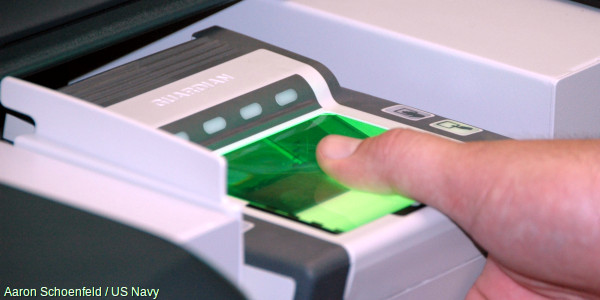
Photo: A typical optical fingerprint scanner—it’s a bit like photocopying your hand or placing it on a computer scanner. Photo by Tech. Sgt. Francisco V. Govea II courtesy of US Army.
There are two main ways of scanning fingers. An optical scanner works by shining a bright light over your fingerprint and taking what is effectively a digital photograph. If you’ve ever photocopied your hand, you’ll know exactly how this works. Instead of producing a dirty black photocopy, the image feeds into a computer scanner. The scanner uses a light-sensitive microchip (either a CCD, charge-coupled device, or a CMOS image sensor) to produce a digital image. The computer analyzes the image automatically, selecting just the fingerprint, and then uses sophisticated pattern-matching software to turn it into a code.

Another type of scanner, known as a Capacitive scanner, measures your finger electrically. When your finger rests on a surface, the ridges in your fingerprints touch the surface while the hollows between the ridges stand slightly clear of it. In other words, there are varying distances between each part of your finger and the surface below. A Capacitive scanner builds up a picture of your fingerprint by measuring these distances. Scanners like this are a bit like the touchscreens on things like i Phones and i Pads.
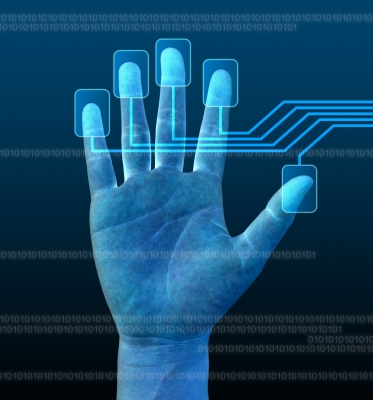
What happens during a scan?
Unlike ordinary digital photos, scans have to capture exactly the right amount of detail—brightness and contrast—so that the individual ridges and other details in the fingerprint can be accurately matched to scans taken previously. Remember that fingerprints might be used as evidence in criminal trials, where a conviction could result in a long jail sentence or even the death penalty. That’s why “quality control” is such an important part of the fingerprint scanning process.

Photo: Quality counts: fingerprint scans have to produce images with enough detail to allow an accurate comparison with other scanned images.
Here’s how the process works with a simple optical scanner:
- A row of LEDs scans bright light onto the glass (or plastic) surface on which your finger is pressing (sometimes called the platen).
- The quality of the image will vary according to how you’re pressing, how clean or greasy your fingers are, how clean the scanning surface is, the light level in the room, and so on.
- Reflected light bounces back from your finger, through the glass, onto a CCD or CMOS image sensor.
- The longer this image-capture process takes, the brighter the image formed on the image sensor.
- If the image is too bright, areas of the fingerprint (including important details) may be washed out completely—like an indoor digital photo where the flash is too close or too bright. If it’s too dark, the whole image will look black and details will be invisible for the opposite reason.

- An algorithm tests whether the image is too light or too dark; if so, an audible beep or LED indicator alerts the operator and we go back to step 1 to try again.
- If the image is roughly acceptable, another algorithm tests the level of detail, typically by counting the number of ridges and making sure there are alternate light and dark areas (as you’d expect to find in a decent fingerprint image). If the image fails this test, we go back to step 1 and try again.
- Providing the image passes these two tests, the scanner signals that the image is OK to the operator (again, either by beeping or with a different LED indicator). The image is stored as an acceptable scan in flash memory, ready to be transmitted (by USB cable, wireless, Bluetooth, or some similar method) to a “host” computer where it can be processed further. Typically, images captured this way are 512×512 pixels (the dimensions used by the FBI), and the standard image is 2.5cm (1 inch) square, 500 dots per inch, and 256 shades of gray.
- The host computer can either store the image on a database (temporarily or indefinitely) or automatically compare it against one or many other fingerprints to find a match.

What can you use fingerprint scanning for?

Photo: Biometrics isn’t necessarily sinister. Here, a child’s fingerprints are being taken to help with identification after a humanitarian disaster. Photo by Porter Anderson courtesy of US Navy.
Fingerprint Scanning is the most popular Biometric Technology (used in over half of all Biometric security systems)—and it’s easy to see why. We store more and more information on our computers and share it, online, in ever more risky ways. Much of the time, our bank information and personal details are protected by just the few hastily thought-out numbers in our passwords. Anyone can use your credit or debit card to get money from an ATM (automated teller machine or ” CashPoint “) if they know just four numbers!

In future, it will be much more common to have to confirm your identity with biometric information: either your fingerprint, a scan of the iris or retina in your eye, or a scan of your face. Some laptop computers and cellphones now use fingerprint scanning to make them more secure. Large banks, such as Bank of America and JPMorgan Chase, have introduced fingerprint authentication as part of the signin process for their smartphone apps. Soon we could be seeing fingerprint scanners on ATMs, in airport security scanners, on checkouts in grocery stores, in electronic voting systems, and perhaps even replacing the keys in our (self-driving) automobiles!

Some people don’t like the sound of a “Big Brother” society where you have to do everything with your fingerprints—and it’s true that there are important issues of privacy. But humans have always used biometrics for personal identification: we tell one another apart chiefly by recognizing one another’s faces and voices. Worry about the drawbacks, by all means, but don’t forget the advantages too: your information should be much more secure from criminals—and you’ll never again have the problem of losing your keys or forgetting your password!
